Multiple Gateways as You Grow: Five Ways WISPs Connect to the Internet
Most WISPs start out with a single Internet connection and a default route pointed at it. That’s a fine place to start, but as you add customers, the cost of that one connection going down grows with you, and at some point you’ll want more than one way out of your network. Here are the five gateway configurations we see in the field, in roughly the order networks grow through them.
A quick note on terms first: we’ve always called these gateways, meaning the router (and the site) where your traffic leaves your network for an upstream provider. The connection itself is usually sold as “IP transit”, so you’ll also hear people talk about transit providers or upstreams. These are all describing the same handoff, just from different sides of it.
One gateway and a default route
This is where most WISPs start out, and it’s by far the simplest option: one upstream provider, one router, and a default route sending everything their way. There’s nothing to configure beyond the basics and nothing to maintain, and for a small network it’s often all you need.
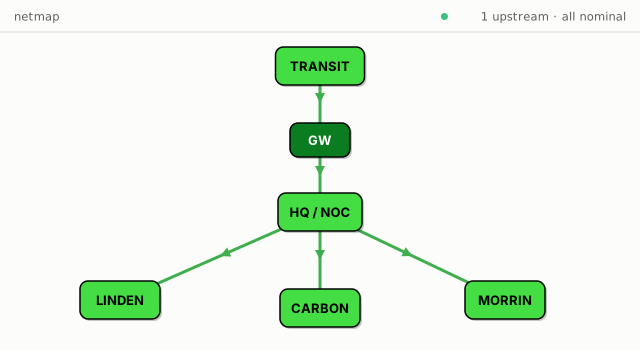
The obvious problem is that if your provider goes offline, your whole network is down with them. Early on that’s usually a risk you can live with, but the bigger you get, the more it hurts when it happens.
A second connection as a backup
The first step up is a second upstream connection into the same core router, used purely as a backup. With MikroTik this is often done with a netwatch script that pings something out the primary connection and flips the default route over to the secondary when it stops responding (newer RouterOS can also do this with recursive routes and no script at all).
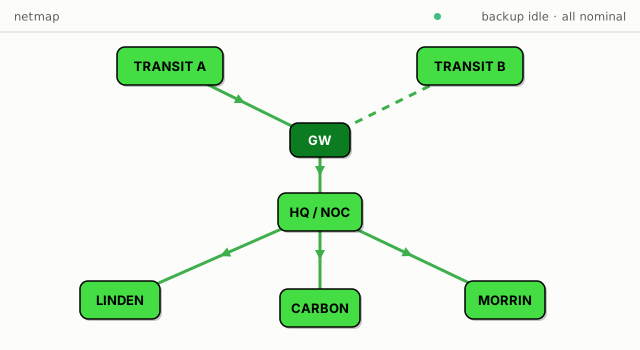
This can keep your customers online through a provider outage, which is exactly what it’s for. The catch is that your public addresses are only routed through your primary provider, so while running on the backup, traffic has to be NATed out of addresses belonging to the secondary. Customers who are just browsing will hardly notice, but anyone with a static public IP hosting something will see their inbound traffic break for the duration. The other thing that stings a little is that the secondary connection sits completely unused whenever the primary is up, so you’re paying every month for a connection you only use during outages. It’s still fairly cheap insurance though.
Two providers with full tables BGP
The proper fix for those failover problems is to run BGP with both providers and announce your own address space through each of them. This used to mean expensive specialty routers, but modern ARM64 MikroTiks handle full tables without much fuss (the full IPv4 table passed a million routes a while ago and is still growing around 5% a year, and a current CCR loads it just fine).
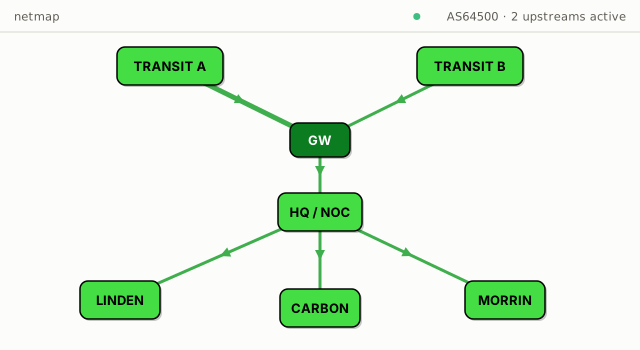
The paperwork is the bigger hurdle. You’ll need to register with ARIN and get an ASN assigned, you need two upstream providers that will actually speak BGP with you (which can sometimes mean more expensive connections, but not always), and you need at least a /24 of public address space (256 IPs), since that’s the smallest block the Internet will accept an announcement for. Buying a /24 outright is expensive (~$7000 USD in 2026), but some wholesale providers still have a lot of space that can be leased at fairly reasonable rates.
What you get for it is real redundancy. If one provider goes down, BGP withdraws the routes and traffic shifts to the other, and inbound traffic to public IPs keeps working the whole time.
When both are online, customer traffic does get split between the two connections, but in ways you have somewhat limited control over: outbound is yours to steer (local preference makes that easy), while inbound is decided by everyone else’s routers, and the best you can do is influence it with AS path prepends. It’ll never be an even split. The whole arrangement also still lives at one site, so the core is still a single point of failure for the network behind it.
Geographically diverse gateways with OSPF
The next step is moving from one gateway site to several, so that losing a whole site (a fibre cut, or a power outage that outlasts your batteries) doesn’t take the network down. Each gateway router runs its own full-tables BGP with its provider, announces your address space, and distributes a default route into OSPF, so every site on the network just sends Internet traffic toward its nearest exit. It’s a very resilient design, and it keeps traffic close to your customers.
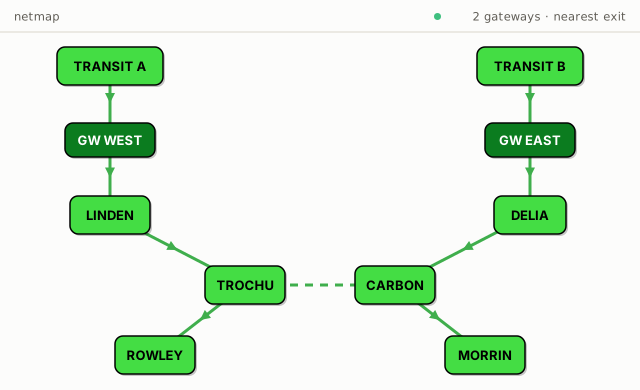
Where this gets tricky is inbound traffic. Unless your network is large enough to split customers into geographic /24s and announce them regionally, the Internet picks which gateway your inbound traffic arrives at, and it has no idea what your internal topology looks like. Traffic can come in the “wrong” gateway and cross half your network on backhauls that weren’t sized for it, sometimes with many more hops, because those internal hops are invisible to the Internet. This matters less for NATed customers, since their traffic always comes back in through the gateway it went out of. The day-to-day cost is that gateway and backhaul capacity planning ends up partly at the whim of Internet peering decisions you don’t control.
A carrier hotel and MPLS/TE
The configuration we like best for larger networks moves the BGP routing out of the field entirely. You lease space at a major carrier hotel and host your BGP router(s) and an aggregation router there, and each fibre gateway out on the network connects back to the aggregation router with either point-to-point fibre transport or a GRE tunnel.
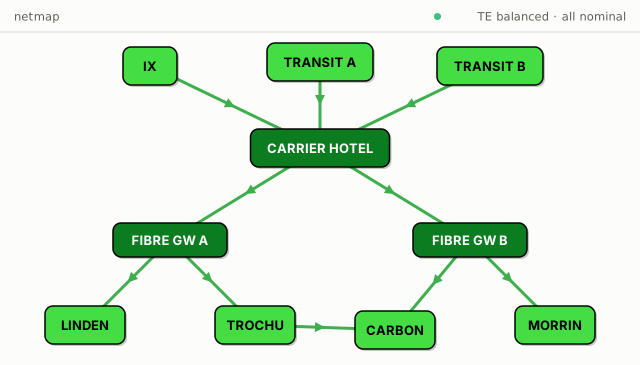
Colocating at a carrier hotel has a bunch of side benefits: direct access to Internet exchanges, and far more choice in upstream providers, often at much better prices since they’re all competing in the same building. With BGP announced from a single location, you’re also no longer juggling prepends or worrying about a peering change shifting load across your internal network.
The aggregation router is where the balancing happens. It can run something like Swift Fox’s MPLS/TE Auto Balancing, which knows the capacity of each fibre gateway as well as the live capacity of every backhaul, and spreads traffic across the available paths to keep them evenly loaded. If a fibre gateway goes down, or a backhaul loses a big chunk of its capacity to weather, traffic gets rerouted to stay evenly balanced across whatever is left. And if anything ever goes wrong with the TE orchestration itself, ordinary OSPF routing is still underneath it as a fallback.
One callout on the tunnels: true point-to-point fibre transport can be expensive and isn’t available everywhere, so many ISPs use GRE tunnels so they can use the same design over any Internet connection instead. The trade-off is MTU, because GRE adds 24 bytes of overhead, so your customers’ 1500-byte packets no longer fit through a standard 1500 MTU Internet path (the tunnel works out to 1476). Swift Fox Auto Balancing will automatically clamp the TCP MSS on the tunnel, but everything else gets fragmented and reassembled at the tunnel endpoints. Modern ARM64 MikroTiks can do the reassembly without much CPU impact, but it’s still a thing to be aware of if you’re running older MikroTik gateway routers.
The costs are the rack space and the transport back to it, and technically you’ve concentrated your Internet edge into one building again, although carrier hotels are about the most reliable buildings you could pick for it.
Which one should you run?
Most networks grow through these in order, and the right one really just depends on where you are. A single gateway is fine when you’re small, a backup connection is cheap insurance once outages start meaning real support pain, and the jump to your own ASN and address space with full tables BGP is the point where provider outages stop being visible to customers at all. Geographic diversity and the carrier hotel configuration tend to follow naturally as fibre becomes available at more of your sites.
We’ve helped operators through every one of these transitions, and the MPLS/TE balancing in the last one is built into Swift Fox directly. If you’re planning the jump to BGP, or trying to tame a multi-gateway network that grew organically, reach out and we’ll talk through what it would look like on your network.